Apple Boom Cards Bundle for Kindergarten | Fall Math & Literacy Digital Centers
Looking for engaging Apple Boom Cards for kindergarten that support fall math centers, digital literacy centers, and distance learning?
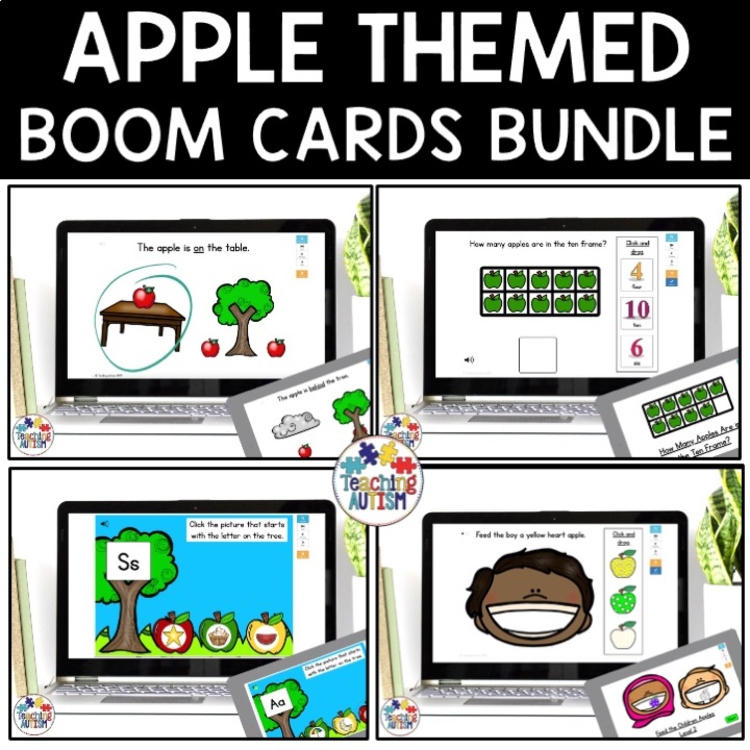
This Apple Activities Boom Cards Bundle includes interactive, no-prep fall digital activities designed for kindergarten, first grade, and special education students. Perfect for autumn themes, apple units, online learning, and paperless classrooms.
These apple-themed Boom Cards help students practice essential math and literacy skills while staying engaged in a fun fall theme.
Boom Cards Included:
- Missing Numbers to 10.
Click here for a playable preview. - Apple Prepositions.
Click here for a playable preview. - Matching Uppercase and Lowercase Letters.
Click here for a playable preview. - Sorting Nouns and Verbs.
Click here for a playable preview. - Matching Initial Sounds.
Click here for a playable preview. - Number Sense Matching.
Click here for a playable preview. - Following Directions – Feeding Kids Apples – Level 1.
Click here for a playable preview. - Following Directions – Feeding Kids Apples – Level 2.
Click here for a playable preview. - Apple Ten Frames.
Click here for a playable preview. - Matching Color Apples.
Click here for a playable preview. - Click and Drag Matching Color Apples.
Click here for a playable preview. - Telling Time – 4 Levels.
Click here for a playable preview. - Counting and Putting Apples on the Tree.
Click here for a playable preview. - Counting Apples on the Tree.
Click here for a playable preview. - 2D Shape Matching Apples.
Click here for a playable preview. - Making 10.
Click here for a playable preview.
When you purchase this bundle, download the bonus file titled “CLICK ME I AM YOUR LINK” and open it in a PDF reader. This file contains the link that allows you to add all decks to your Boom library at once.
Skills Covered
This bundle supports a wide range of kindergarten math and literacy skills:
Math Skills
- Missing numbers to 10
- Apple ten frames
- Making 10
- Counting apples
- Number sense matching
- Telling time (4 levels)
- 2D shape matching
Literacy Skills
- Matching uppercase and lowercase letters
- Matching initial sounds
- Sorting nouns and verbs
- Apple prepositions
- Following directions (2 differentiated levels)
Visual & Concept Skills
- Matching colors
- Click and drag color matching
- Counting and placing apples
These interactive digital activities make skill practice engaging and meaningful.
When you purchase this bundle, download the bonus file titled ‘CLICK ME I AM YOUR LINK’ and open in a PDF reader. This will have a link for you to be redirected to the Boom website for you to add all parts of this bundle at once to your library.
Easy to Use
Boom Cards require no printing, cutting, or laminating.
Simply assign the deck to your students and they can begin immediately. These digital task cards are self-checking, making them perfect for independent work.
To use Boom Cards, you must have internet access. Boom Cards play on modern browsers including Chrome, Safari, Firefox, and Edge. Apps are available for Android, iPads, iPhones, and Kindle Fire devices.
Adults must have a Boom Learning account to assign cards. You can assign decks using Fast Pins for instant student feedback. A paid subscription is required for tracking student progress, but a free trial is available for new users.
Perfect For
- Kindergarten fall centers
- Apple theme units
- Special education classrooms
- Distance learning
- Online learning
- Technology stations
- Small group instruction
- Independent digital work
Why Teachers Love This Apple Boom Cards Bundle
- No prep, paperless learning
- Perfect for fall math and literacy centers
- Great for distance learning or classroom technology stations
- Self-checking for instant student feedback
- Differentiated skill levels included
- Easy to assign and track student progress
Simply assign the deck and your students are ready to learn.
Please Note:
To use Boom Cards, you must be connected to the Internet. Boom Cards play on modern browsers (Chrome, Safari, Firefox, and Edge). Apps are available for modern Android, iPads, iPhones, and Kindle Fires. For security and privacy, adults must have an account to use and assign Boom Cards. You will be able to assign the Boom Cards you are buying with “Fast Pins,” (a form of play that gives instant feedback to students for self-grading Boom Cards). For assignment options that report student progress back to you, you will need to purchase a subscription. If you are new to Boom, you will be offered a free trial. Read here for details: http://bit.ly/BoomTrial.
Click below to find:
Once you have purchased this resource don’t forget to come back and leave feedback to help you gain some TpT credits! If you want to keep up to date with my sales, new resources, freebies and so much more click here.
I love to see my resources in action in your classrooms, if you use one and would like to send me an image of it you can send to me @teachingautism on Instagram! Follow me here.
What are TpT Credits?
You can gain TpT credits by going back and leaving feedback on any purchases that you have made. The credits build up and then you can use them off future purchases – from any seller on TpT!



