CVC Words Code Word Cracker Boom Cards | Distance Learning
Do your students need to work on their CVC words and initial letter skills? Are you looking for an engaging, online resource that makes spelling fun? If so, this ‘CVC words code word cracker’ resource is perfect for your students!
This resource is a digital Boom learning resource – making it perfect for distance learning.
What’s Included?
- 6 images/tasks for each medial vowel; a, e, i, o, u.
How to Use
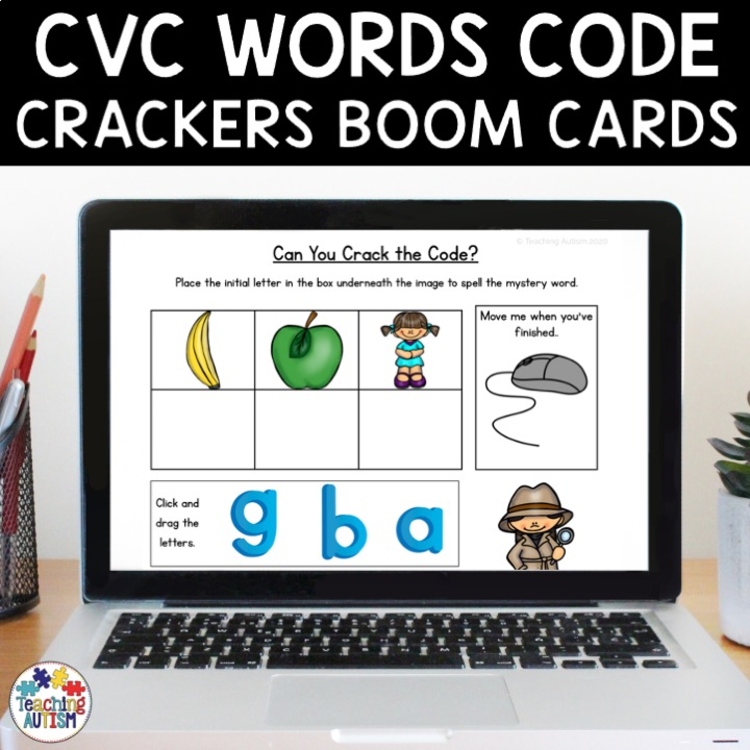
- Can you help the detective crack the code and work out the mystery CVC words?
- Students need to identify what each of the images are in the table and what their initial letter is.
- Then, students drag the letters from the bottom of the page into the boxes.
- From here, students can then drag the box out of the way to see the CVC word and image.
- They can then click ‘submit.’
- If their answers are correct, they’ll hear a ‘bing’ and it will move onto the next task.
- If their answers are incorrect, they’ll hear an ‘oops’ and the incorrect letters will go back to the bottom of the page for them to try again.
Students will love getting the instant feedback, and it’s a great way for your students to be able to correct their mistakes and check their answers.
Click here to have a free playable preview on Boom Learning so you can see how this resource works before you purchase!
When you have purchased this resource, you will find a PDF in your download folder titled ‘CLICK ME I AM YOUR LINK‘ Click this link and it will take you to the digital task cards on the Boom Learning website.
How to Use
The beauty of online Boom Learning cards, means they require no prep. You won’t need to cut, print, laminate or do anything to prepare this resource!
All you need to do is assign the deck to your students – and that’s it! The perfect resource for a paperless classroom, online learning or distance learning.
Please Note:
To use Boom Cards, you must be connected to the Internet. Boom Cards play on modern browsers (Chrome, Safari, Firefox, and Edge). Apps are available for Android, iPads, iPhones, and Kindle Fires. For security and privacy, adults must have a Boom Learning account to use and assign Boom Cards. You will be able to assign the Boom Cards you are buying with “Fast Pins,” (play provides instant feedback for self-grading Boom Cards). Fast Play is always a free way for students to engage with Boom Cards decks. For additional assignment options you’ll need a premium account. If you are new to Boom Learning, you will be offered a free trial of our premium account. Read here for details.
Click below to find:
====================================================================================================
Once you have purchased this resource don’t forget to come back and leave feedback to help you gain some TpT credits! If you want to keep up to date with my sales, new resources, freebies and so much more click here.
I love to see my resources in action in your classrooms, if you use one and would like to send me an image of it you can send to me @teachingautism on Instagram! Follow me here.
What are TpT Credits?
You can gain TpT credits by going back and leaving feedback on any purchases that you have made. The credits build up and then you can use them off future purchases – from any seller on TpT!
====================================================================================================