Identifying Feelings and Emotions | Boom Cards for Special Education
Are you looking for a digital resource for your students to work on identifying feelings and emotions? Do your students need to work on their symbol recognition and sentence building skills? Are you looking for online resources to use with your special education students? If so, this identifying feelings themed sentence building Boom deck is perfect to use with your students.
How to Use
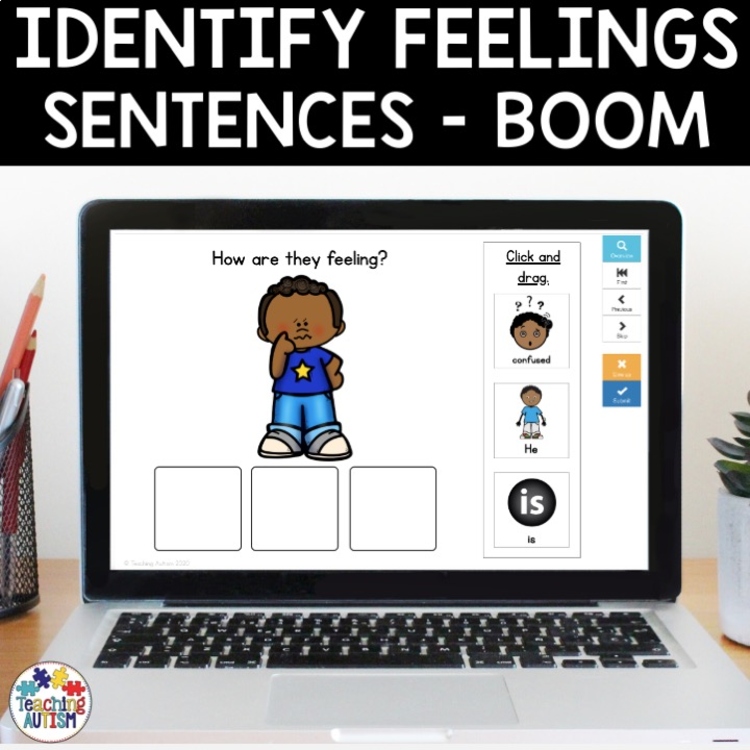
- Each page of the Boom deck contains a question, an image and 3 symbols on the right side of the page
- Students read – or be read – the question, “How are they feeling?”
- Then, students look at the image.
- They then need to decide who it is, and how they are feeling.
- Then, they click and drag the symbols into the 3 empty boxes to form an appropriate sentence.
- If their answers are in the correct order, students will receive a ‘bing‘ noise and be taken to the next question.
- If their answers are in the wrong order, it will say ‘incorrect answer’ and make a ‘whoops‘ noise and students can try again.
Students will love getting the instant feedback, and it’s a great way for your students to be able to correct their mistakes and check their answers.
There are 16 boom cards included.
Click here to have a free playable preview on Boom Learning so you can see how this resource works before you purchase!
When you have purchased this resource, you will find a PDF in your download folder titled ‘CLICK ME I AM YOUR LINK‘ Click this link and it will take you to the digital task cards on the Boom Learning website.
How to Use
The beauty of online Boom Learning cards, means they require no prep. You won’t need to cut, print, laminate or do anything to prepare this resource!
All you need to do is assign the deck to your students – and that’s it! The perfect resource for a paperless classroom, online learning or distance learning.
Please Note:
To use Boom Cards, you must be connected to the Internet. Boom Cards play on modern browsers (Chrome, Safari, Firefox, and Edge). Apps are available for modern Android, iPads, iPhones, and Kindle Fires. For security and privacy, adults must have an account to use and assign Boom Cards. You will be able to assign the Boom Cards you are buying with “Fast Pins,” (a form of play that gives instant feedback to students for self-grading Boom Cards). For assignment options that report student progress back to you, you will need to purchase a subscription. If you are new to Boom, you will be offered a free trial. Read here for details: http://bit.ly/BoomTrial.
Click below to find:
Once you have purchased this resource don’t forget to come back and leave feedback to help you gain some TpT credits! If you want to keep up to date with my sales, new resources, freebies and so much more click here.
I love to see my resources in action in your classrooms, if you use one and would like to send me an image of it you can send to me @teachingautism on Instagram! Follow me here.
What are TpT Credits?
You can gain TpT credits by going back and leaving feedback on any purchases that you have made. The credits build up and then you can use them off future purchases – from any seller on TpT!